Review summary
- What it is
- The multi-database edition of Navicat, a commercial desktop client for MySQL, PostgreSQL, SQL Server, Oracle, SQLite, MariaDB, MongoDB, Redis and Snowflake.
- Version tested
- Navicat Premium 18.0.5 Enterprise (subscription) on Windows 11, against MySQL 8.0.46.
- Strengths
- Accurate schema and data comparison with readable scripts, a transaction-wrapped data sync, live SQL error detection, and data modelling in Enterprise.
- Limitations
- Masking and sync defaults need checking before you run them; with our restricted test login a stored procedure was scripted incompletely without a warning; the AI features need your own provider account and are not yet tested.
- Price
- Standard from USD 74.99 a month, USD 749.99 a year or USD 1,499 perpetual; Premium Lite is free with a reduced feature set (list prices, 6 November 2026).
- Our verdict
- A capable, promising toolkit for DBAs and teams who compare, synchronize and mask data across environments; developers who mainly write queries can start with a free tool.
Introduction and review summary
Navicat Premium is the multi-database edition of Navicat, the commercial database client from PremiumSoft. Instead of one tool per engine, it connects to nine database engines from one window and adds the jobs that usually need separate utilities: comparing and synchronizing schemas, moving and masking data, scheduling routine work and, in the Enterprise edition, data modelling. Version 18 adds AI assistance in the table designer and data grid, live error detection in the query editor, and new masking and modelling options.
Our earlier DBeaver vs Navicat comparison was written from documentation alone. When Navicat gave us access to Premium 18, we built small MySQL test databases with differences we planted on purpose, so we could see whether Navicat found exactly what we put there. Our first impression is positive: the comparison and synchronization tools were accurate and easy to follow. We also hit real rough edges, and we report those too. If you are choosing between tools, see our DBeaver vs Navicat comparison; for every Navicat edition at a glance, see our Navicat tool profile.
Testing methodology and environment
We tested on one Windows workstation against a local MySQL server holding databases created for this review. All data is synthetic: invented names, example.com email addresses and phone numbers from a range reserved for fiction. Navicat connected with a separate login that could reach only those test databases, and no production system took part.
Every test started from a known state with deliberate differences, for example five changed rows between two copies of a table, and every deployment ran against a disposable copy. After each run we checked the target database independently with our own SQL queries rather than relying on Navicat's summary. We did not run benchmarks, so this review contains no timings or speed comparisons.
| Test detail | Information |
|---|---|
| Product | Navicat Premium 18, Enterprise edition, subscription licence provided by Navicat |
| Version | 18.0.5 for Windows (64-bit) |
| Operating system | Windows 11 Pro, build 26300 |
| Database engine | MySQL 8.0.46, local test server |
| Test data | Synthetic data in dedicated test databases; no production data |
| Evaluation period | 6 November 2026 |
| Features tested | Connection setup, object browsing, structure synchronization, data synchronization, data masking, SQL editor error detection and formatting, reverse engineering to a data model |
| Features not tested | AI features (AI Assistant, Create Table with AI, Fill with AI), engines other than MySQL, BI, backup, scheduling, import wizard, collaboration |
Installation, setup and interface
Navicat Premium 18 runs on 64-bit Windows 8 to 11 and Windows Server 2012 to 2025, on macOS 14 and later, and on Linux as a Flatpak or AppImage. We used the Windows build 18.0.5. The main window keeps Navicat's familiar layout: connections on the left, objects in the centre and an information pane on the right, under a toolbar with Connection, New Query, Table, View, Function, User, Backup, Automation, Model and BI.
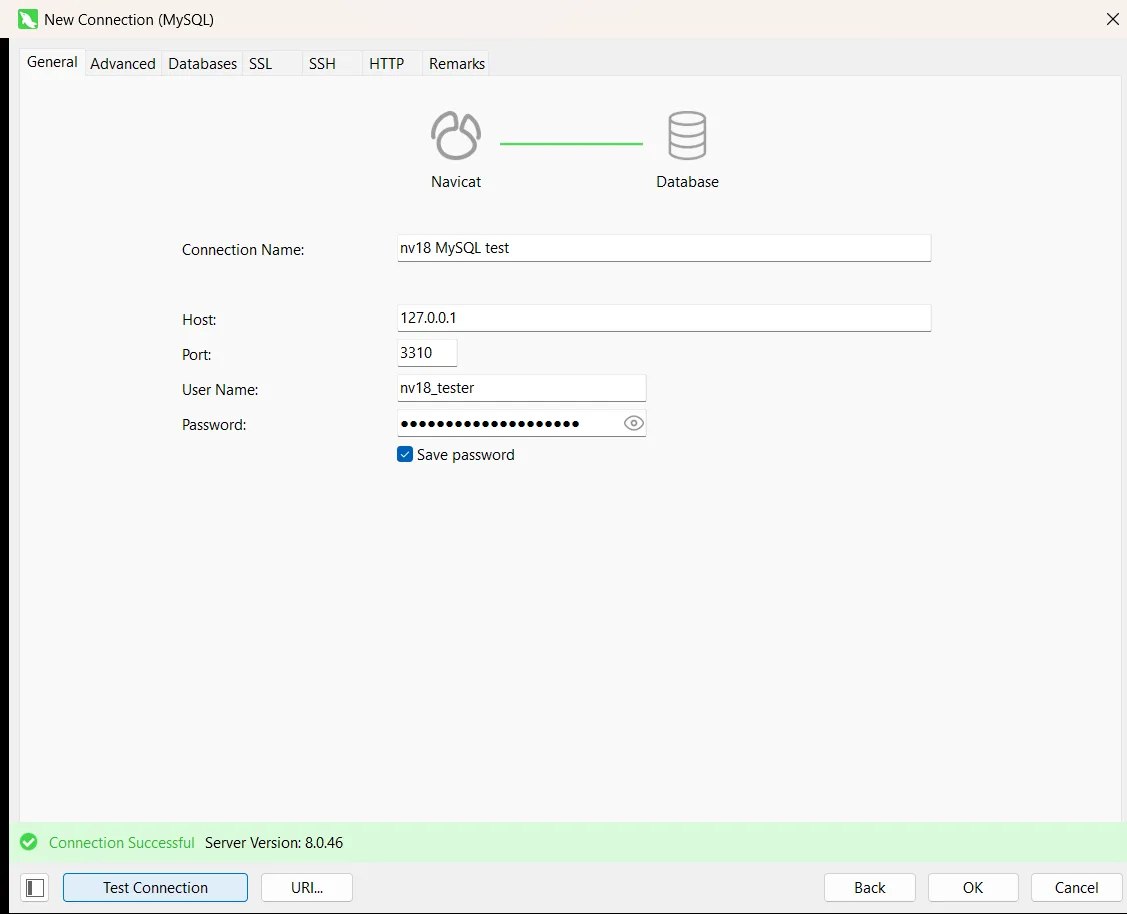
Creating a connection starts with a picker showing the nine core engines and a grid of cloud services such as Amazon RDS, Aurora, Redshift and Google Cloud SQL, with filters by engine and vendor. The MySQL dialog has tabs for SSL, SSH and HTTP tunnelling, and Test Connection reported success with the server version (8.0.46) on the first try. Inside a database, objects are grouped as Tables, Views, Functions, Queries and Backups.
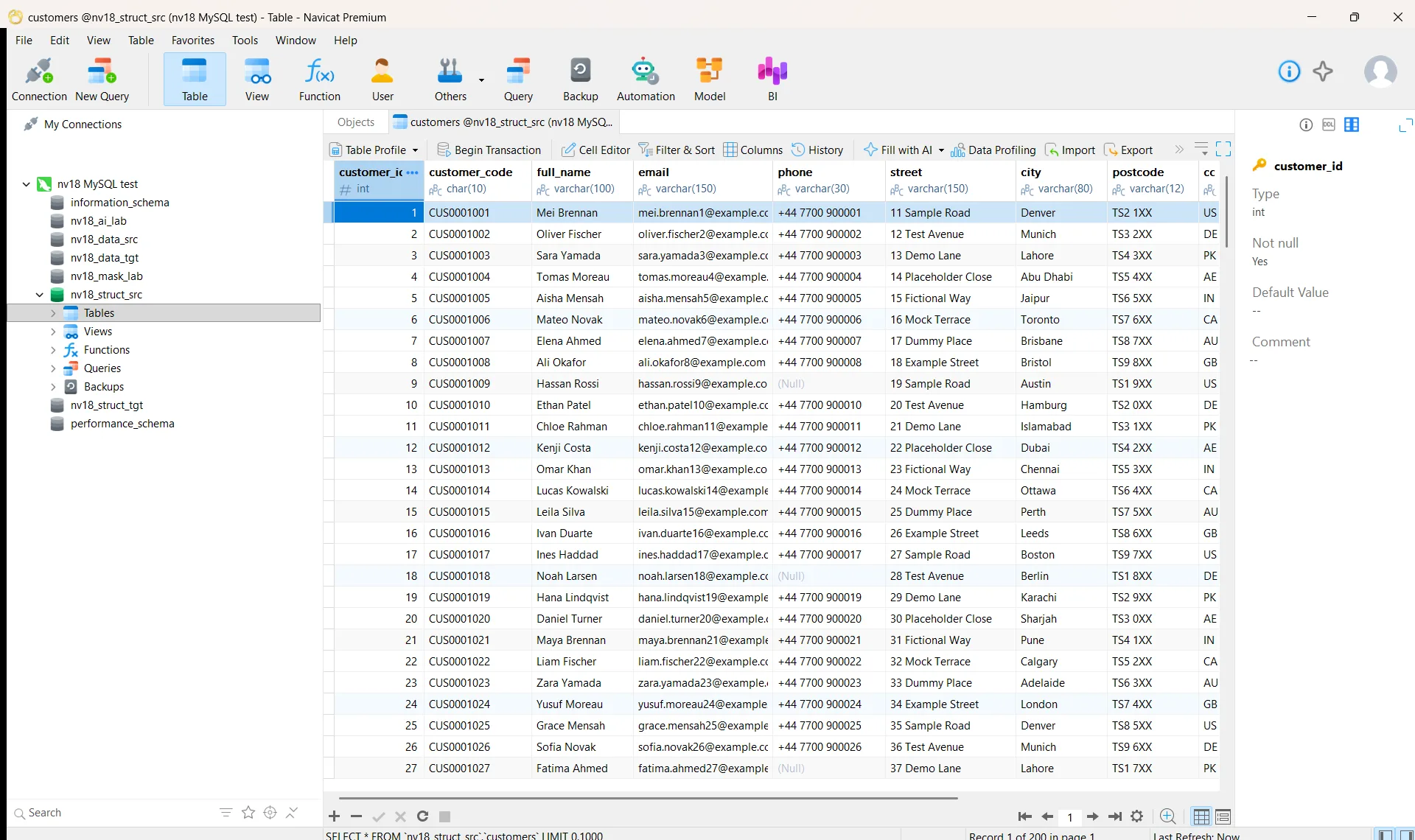
Opening a table shows each column's data type under its name, which is handy when checking data against the schema, and the grid toolbar puts Fill with AI, Data Profiling, Import and Export one click away. One irritation: the first time we opened several screens, a "What's New in Navicat 18" tour popped up and had to be closed before we could continue.
Database connectivity and management
Navicat lists nine core engines for Premium 18: MySQL, PostgreSQL, SQL Server, Oracle, SQLite, MariaDB, MongoDB, Redis and Snowflake, plus managed services including Amazon RDS and Aurora, Azure SQL Database, Google Cloud SQL and MongoDB Atlas. The free Premium Lite connects to the same nine; extra engines such as OceanBase, TiDB and Dameng need a paid edition.
We connected only to MySQL, so PostgreSQL, SQL Server, Oracle, MongoDB and the other engines are documented here, not tested. Within MySQL, browsing tables and switching between databases was straightforward, and the connection panel shows the server version, host, port and user at a glance. For setup steps on other engines, see our guides to connecting Navicat to SQL Server and connecting Navicat to PostgreSQL.
AI Table Designer: creating tables from a prompt
"AI Table Designer" is our shorthand. Navicat's manual calls the feature Create Table with AI: in the Table Designer you click Ask AI, describe a table in plain language, and the AI Assistant proposes a complete structure that you review and edit before saving. In our installation the object toolbar shows a New Table with AI button next to New Table. A related option, Fill Comment with AI, writes a table description from the column definitions. Both are in the Standard and Enterprise editions only.
Navicat does not supply the AI itself. You connect your own account with a provider such as OpenAI, Anthropic Claude, Google Gemini, DeepSeek or a local Ollama or LM Studio model, and the AI Assistant stays disabled until you do. Prompts leave your machine: the manual says the query text, the server version and information about the selected schema are sent to the provider, so check your organisation's rules first.
We have not yet tested Navicat Premium 18's AI functionality firsthand. We plan to evaluate these capabilities separately and update this review with our findings.
Fill with AI
Fill with AI brings the same assistant into the data grid, where we saw its button on the table toolbar. According to the manual it can generate synthetic values for selected cells, or update, summarise or translate existing column data, for the current page, a custom selection or new records; you review the proposal before clicking Fill. It is listed for Standard and Enterprise, on MySQL, Oracle, PostgreSQL, SQLite, SQL Server, MariaDB and Snowflake. Because cell content can be sent to the AI provider, use it on synthetic or sanitised tables only.
Fill with AI is part of the AI functionality we have not yet tested firsthand; we will report on it in the same follow-up evaluation.
Data masking
Masking replaces sensitive values so a copy of a database can be used for development, testing or demos. Navicat documents five techniques: substitution, variance, hashing, nulling and shuffling. The masking is static, meaning it writes changed data: you either transfer a masked copy to another database or file, or mask the existing tables in place, which the manual says should follow a backup. It is in Standard and Enterprise, not Lite.
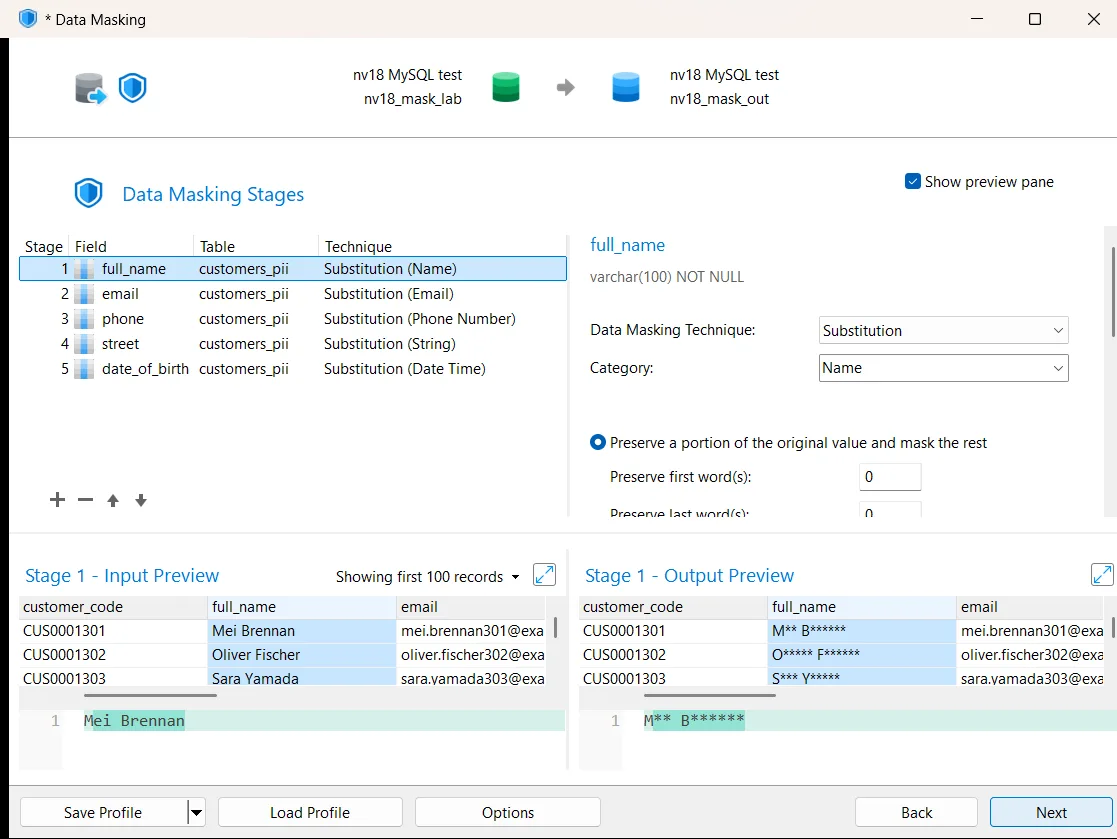
Our test table held 50 synthetic people. We chose the safer "transfer masked data to another database" strategy and selected five columns: name, email, phone, street and date of birth. Navicat proposed a suitable substitution category for each column by itself and shows a live before-and-after preview per stage: "Mei Brennan" became "M** B******", "+44 7700 900301" became "+44 **** **0301", and a date of birth was truncated to 1 January of the same year.
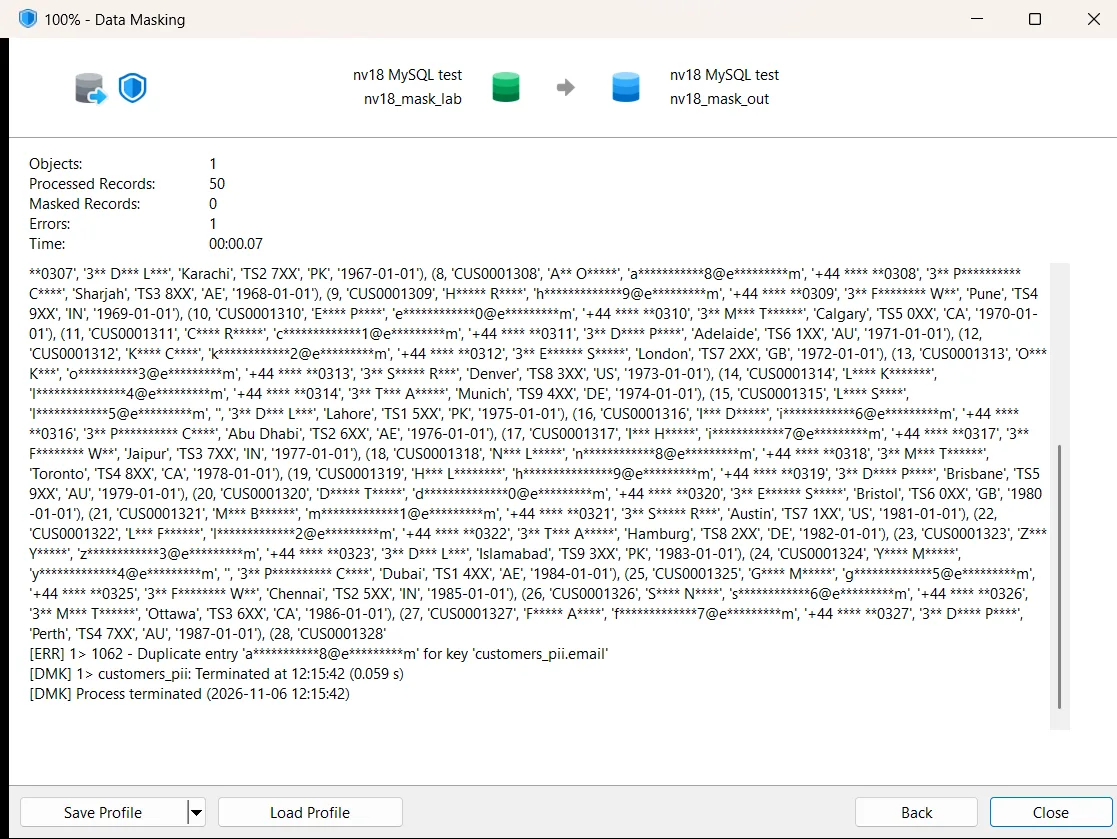
The first run, using Navicat's suggested email rule on our table, failed. That rule keeps the first character and masks the rest, including the domain, so in our data different addresses collapsed into the same value. Our test table has a UNIQUE key on email, the masked copy keeps it, and MySQL rejected the copy with error 1062, "Duplicate entry 'a***********8@e*********m' for key 'customers_pii.email'". Navicat stopped the run and reported 0 masked records, and the log made the cause easy to find.
Switching the email column to hashing (MD5 by default) fixed it: the second run masked all 50 records with no errors and 50 distinct values, although the hashes no longer look like email addresses. Checking the copy ourselves, we found one more change under the settings we used (the suggested phone number substitution): the five phone numbers that were NULL in the source had become empty strings. For test data that matters, because NULL and an empty string behave differently in queries.
Both issues came from our specific test settings and data, a unique email column and a nullable phone column, and other rules or tables may behave differently. The lesson is that masking defaults need checking against your own constraints and NULL rules. Masking also is not anonymisation: partially masked values keep some original characters, and hashes of predictable values can sometimes be guessed, so treat it as one control rather than proof of compliance.
Structure and data synchronization
Both synchronization tools are in Standard and Enterprise only, and both follow the same wizard: choose source and target, compare, review, deploy. Every wizard screen can save its settings as a profile for reuse.
Structure synchronization
Our source and target databases differed in five planted ways: an extra column, a phone column widened from VARCHAR(20) to VARCHAR(30), an extra index, a view and a stored procedure. Navicat found all five and nothing else. It groups results into objects to be modified, created and deleted, and lets you drill into a table to see each column and index marked as changed, added or unchanged. The CHECK constraint, primary key and table options were correctly reported as identical. Nothing is selected by default, so you tick exactly what to deploy.
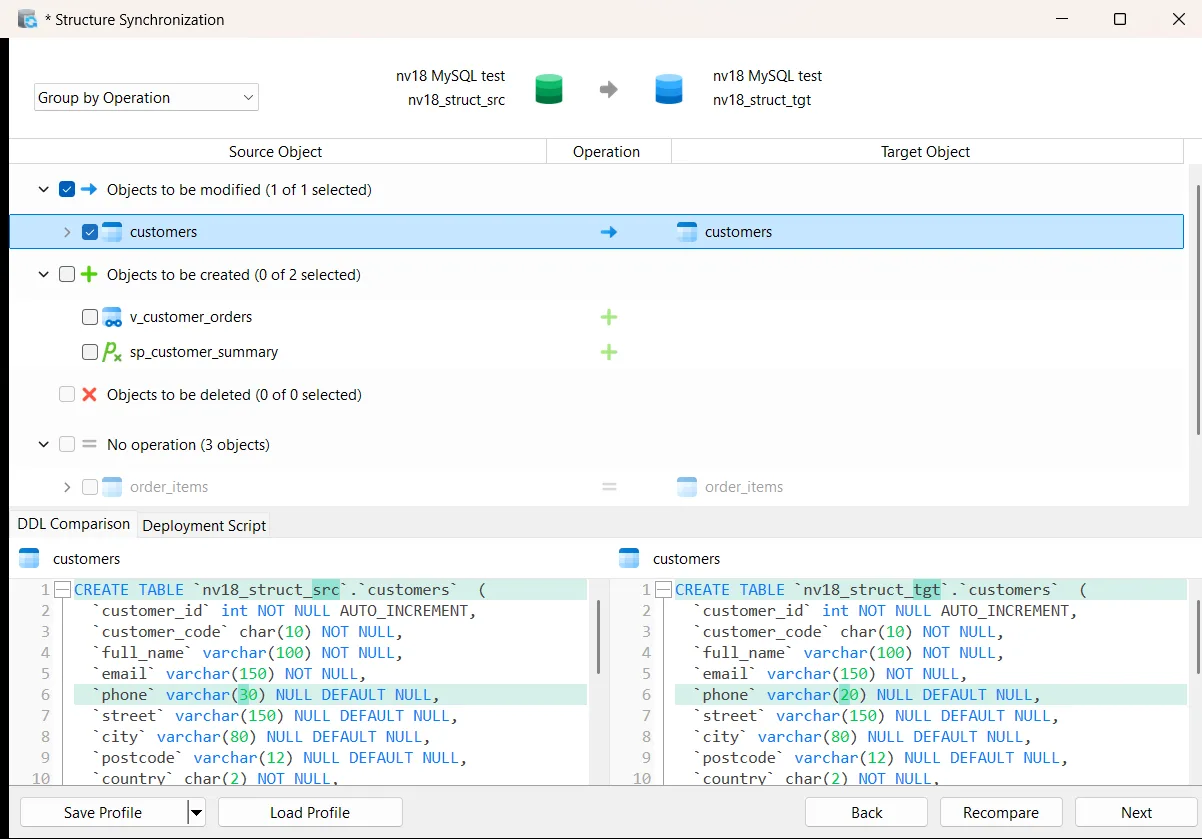
The deployment script was clear and correctly ordered: it added the column in the right position (AFTER status), widened phone, added the index and created the view, all wrapped in SET FOREIGN_KEY_CHECKS. One statement was wrong. The stored procedure was generated as CREATE PROCEDURE with an empty parameter list and no body, and the run stopped at it with MySQL error 1064, leaving the view uncreated.
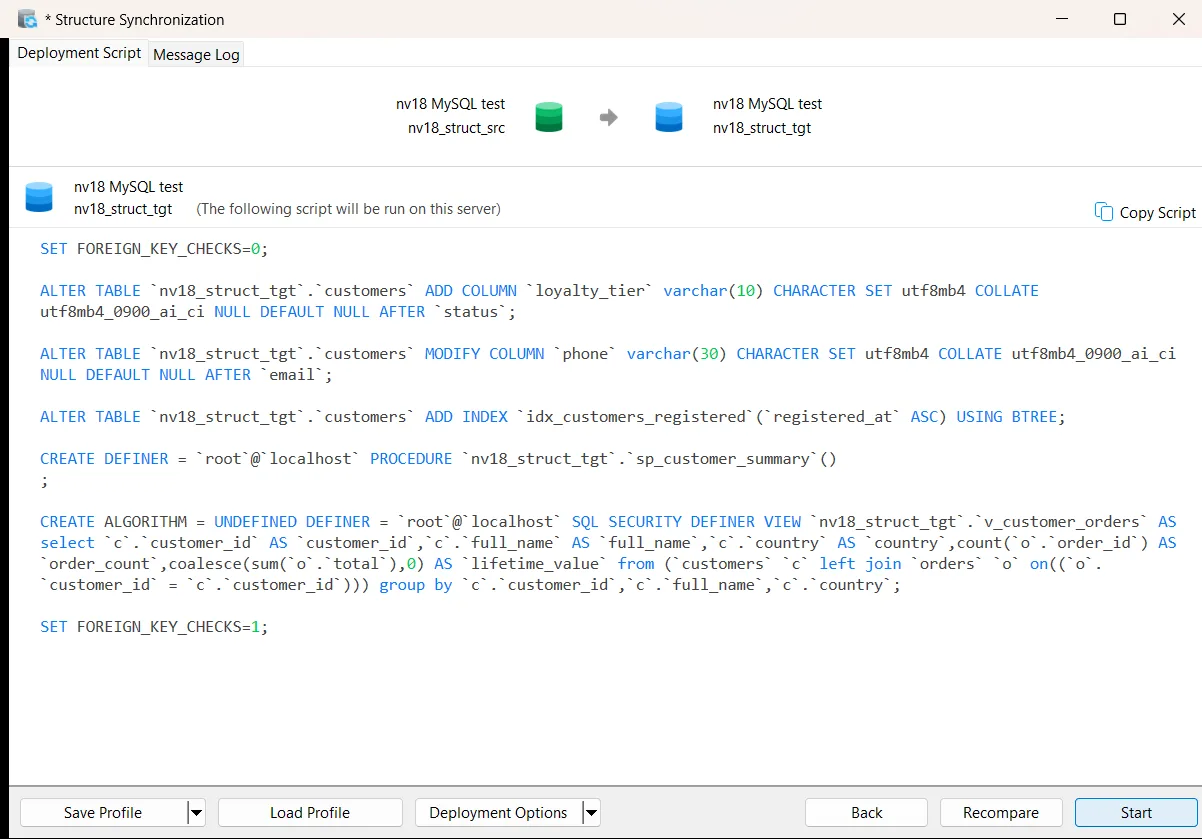
We traced the cause to our test environment. Navicat connected with a deliberately restricted login, and MySQL does not show a procedure's body to an account that does not own it unless it has extra privileges, so Navicat received no body to copy. With an account that can read routine definitions, this failure should not occur. What Navicat could do better is flag the problem: it generated an incomplete statement and gave no warning at the comparison or script stage, so we only found out when the deployment failed. The scripts also keep the source DEFINER, which can fail when the deploying account lacks the privilege to create objects for that user. Run structure sync with an account that can read routine definitions, and read the script before you click Start.
Data synchronization
Our two customer tables differed by five rows only in the source, five rows with older values in the target and three rows only in the target. Navicat reported exactly 5 inserts, 5 updates and 3 deletes, with 110 identical rows, and showed the source and target versions of each row side by side with a checkbox per row. The table mapping screen also offers the Conditions filter that is new in version 18.
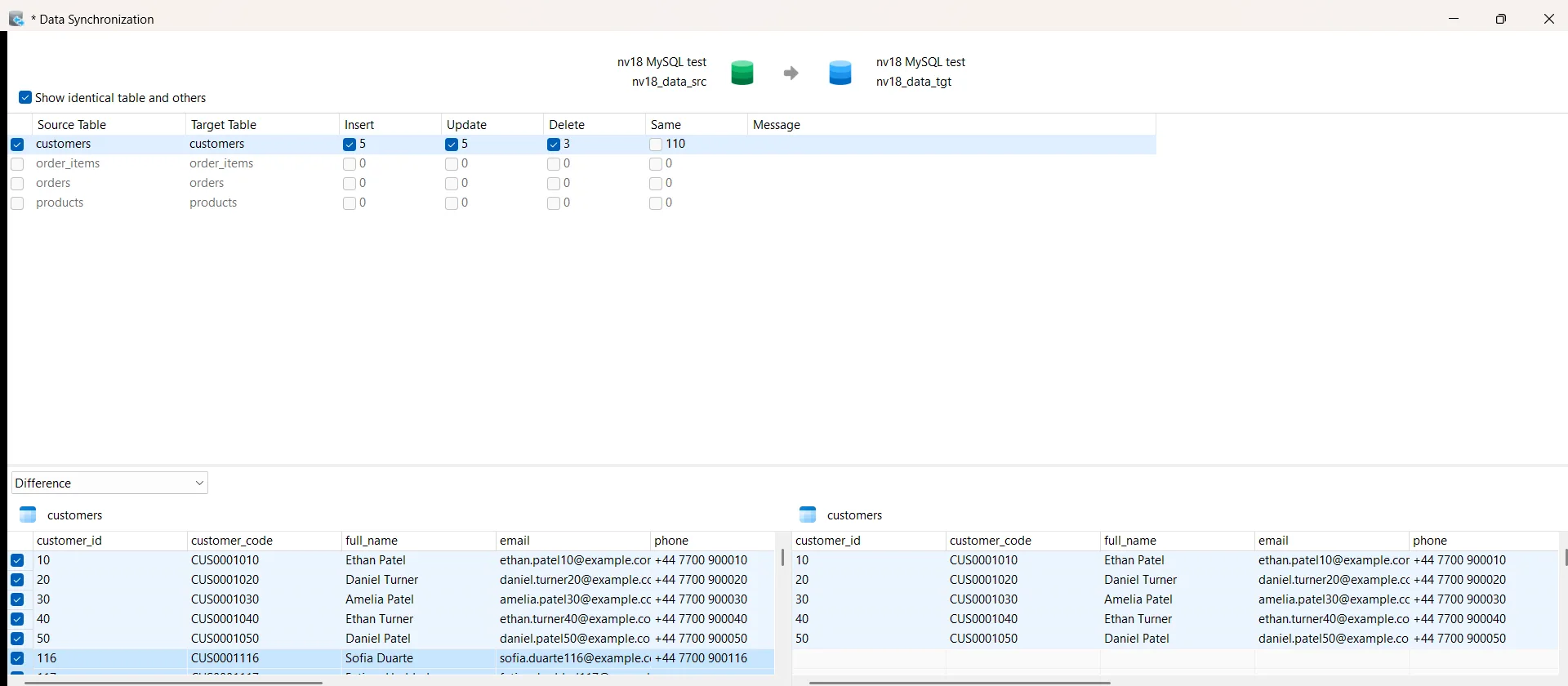
Two defaults deserve attention. Insert, update and delete are all switched on, so rows that exist only in the target are deleted unless you untick them, and the script runs the deletes first. Each update also rewrites every column of the row rather than only the changed ones. On the positive side, deployment runs in a transaction by default. The log reported 15 executed statements, the 13 row changes plus the two statements that switch foreign key checks off and back on, all committed together, and our own check of the target confirmed the result.
SQL editor and error detection
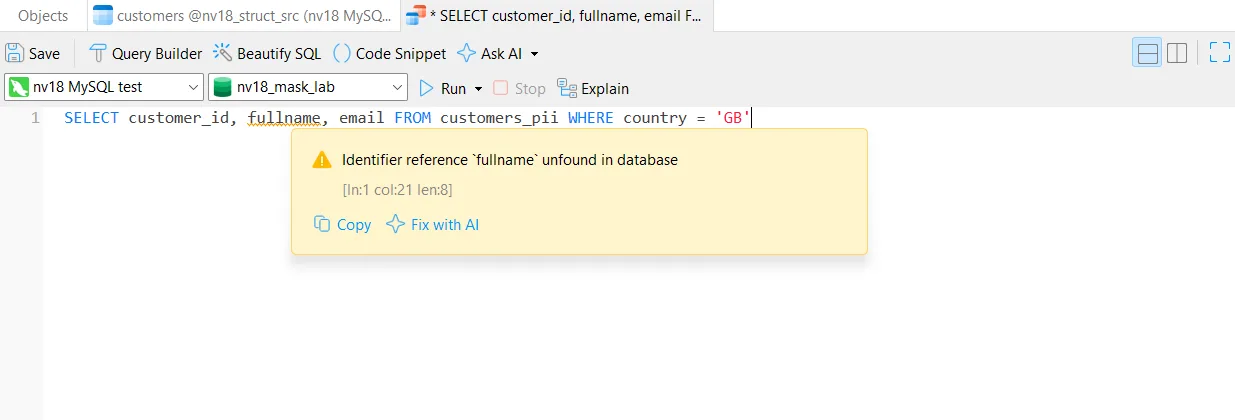
Navicat calls its live checking Real-time Error Detection, and its feature matrix includes it in every edition, Premium Lite included. We typed a query with a misspelled column and, before running anything, the editor underlined it with the message "Identifier reference `fullname` unfound in database", plus Copy and Fix with AI links. Running it returned MySQL's own error 1054, "Unknown column 'fullname' in 'field list'".
In a batch of five mistakes, the editor flagged a misspelled keyword (SELEC) as a syntax error, an unknown table as a missing identifier, and SQL Server's TOP syntax as a syntax error in MySQL, which shows it knows the dialect. It did not flag a GROUP BY that names a column without aggregating it, which only the server's rules reject, or a missing comma that turns a column into an alias, which is valid SQL. That is the right split: the editor catches syntax and schema mistakes, while the database remains the authority on its own rules. When the batch ran, Navicat stopped at the first error.
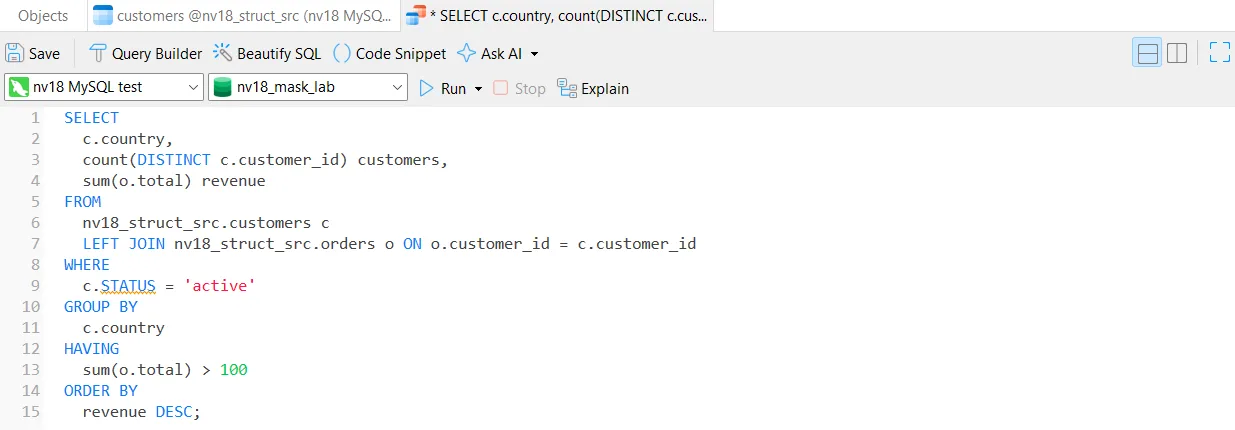
Hovering over a valid column shows its table and database with a Jump to Parent link. Beautify SQL turned a one-line query into one clause per line with upper-case keywords, but it also changed our column name status to STATUS, apparently treating it as a keyword, and the editor then underlined it. The query still ran because MySQL column names are not case sensitive, but it is a quirk to know about.
Data modelling and additional features
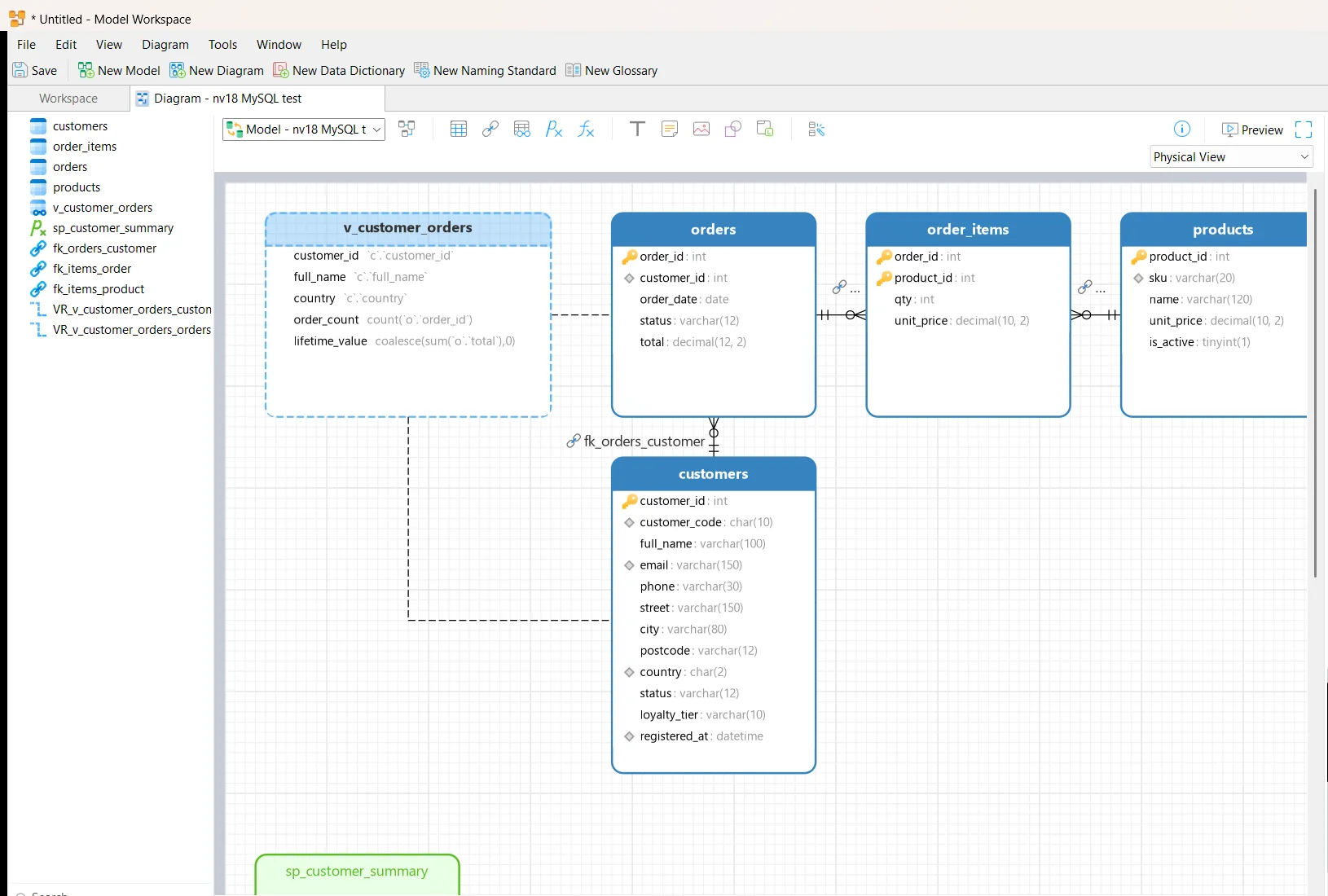
Data modelling and BI are Enterprise features. Right-clicking our test database and choosing Reverse Database to Model produced a diagram of the four tables, the view and the procedure, with all three foreign keys drawn in crow's foot notation, in one step. The model workspace also offers the naming standards and glossary that are new in version 18; we did not test those, or forward engineering. For background, see our guide to entity relationship diagrams.
According to Navicat's feature matrix, every edition imports and exports TXT, CSV, XML and JSON, while Standard and Enterprise add Excel, Access, DBF, ODBC and the new Parquet support, along with backup and restore, data transfer between servers and the automation scheduler. We did not test these. If you move data between systems, our database migration guide covers the wider process.
Performance and usability
We did not benchmark Navicat. On our small test databases every comparison, deployment and masking run finished within seconds, and we saw no hangs or crashes. The wizards are consistent: source and target panels with connection details, a review step, then a log with progress, successes and errors, which made results easy to verify. The friction we met was minor: the what's new popups, and masking field checkboxes that responded to the keyboard (Space) rather than to our mouse clicks in that session. Larger databases may behave differently, so test on a realistic copy of your own data.
Navicat Premium vs Premium Lite, and pricing
Premium Lite is free, and Navicat allows commercial use with up to five Lite users per organisation. It connects to the same nine core engines and keeps live error checking and code completion, but leaves out every tool tested in this review except the editor. The table summarises Navicat's feature matrix as checked on 6 November 2026.
| Feature | Premium Lite | Standard | Enterprise |
|---|---|---|---|
| Nine core engines | Yes | Yes | Yes |
| Live error checking and code completion | Yes | Yes | Yes |
| Refactoring, query builder, visual explain | No | Yes | Yes |
| AI features (your own provider) | No | Yes | Yes |
| Structure and data synchronization | No | Yes | Yes |
| Data masking and data generation | No | Yes | Yes |
| Data transfer, backup, scheduling | No | Yes | Yes |
| Import and export formats | TXT, CSV, XML, JSON | Adds Excel, Access, DBF, Parquet, ODBC | Adds Excel, Access, DBF, Parquet, ODBC |
| Data modelling and BI | No | No | Yes |
List prices on Navicat's store, in US dollars, before any promotion:
| Edition | Monthly | Yearly | Perpetual |
|---|---|---|---|
| Standard | USD 74.99 | USD 749.99 | USD 1,499 |
| Enterprise | USD 99.99 | USD 999.99 | USD 1,999 |
| Non-Commercial | USD 49.99 | USD 499.99 | USD 999 |
List prices checked on Navicat's store on 6 November 2026, before any promotion. Prices change; confirm before buying.
A perpetual licence includes one year of maintenance; a further year costs 16 percent of the licence price, and Navicat says lapsed maintenance cannot be renewed. Licences are per user and the key works on Windows, macOS or Linux. Non-Commercial is limited to education, non-profit use and eligible individuals.
Since modelling needs Enterprise, Standard is the natural choice for teams that only need synchronization and masking. Check the Navicat store before buying, and if a free tool might be enough, see our Navicat alternatives.
Advantages, limitations and verdict
What we liked
- Structure comparison found every planted difference, down to column and index level, with nothing selected until you choose.
- Data synchronization reported exact counts, offered row-level selection and committed in a single transaction.
- Live error detection caught syntax, unknown columns and dialect mistakes before running.
- Masking suggests a technique per column and previews the result.
- Reverse engineering to a model worked in one step (Enterprise).
What could be improved
- With our restricted test login, a stored procedure was scripted as an incomplete statement, and Navicat gave no warning before deployment.
- Under our test settings, the suggested email mask produced duplicates and masking turned NULL phone numbers into empty strings.
- Data sync deletes target-only rows by default and rewrites whole rows on update.
- Beautify SQL upper-cased a column name; first-run tour popups interrupt work.
- The AI features need your own provider account; we have not tested them yet.
Navicat Premium 18 is a capable and promising toolkit. Its comparison and synchronization tools did their core job accurately, and the editor's live checks are useful in every edition. The issues we found are mostly defaults and edge cases rather than broken features, but they are exactly the kind that matter when you point a tool at real data, so review every script and masking rule before running it.
Who should consider it
- Individual SQL developers: for querying and browsing, Premium Lite or a free tool may be enough; the paid editions earn their cost through synchronization and masking.
- Database administrators: the comparison, synchronization, masking and scheduling tools in one product are the main reason to buy Standard or Enterprise.
- Teams managing several engines: one interface across MySQL, PostgreSQL, SQL Server, Oracle and others is the core idea, though we tested MySQL only.
- Businesses needing synchronization or masking: Standard covers both; Enterprise adds modelling and BI.
- Developers well served by free tools: compare the free database management tools first.
Frequently asked questions
Is Navicat Premium 18 worth paying for?
For DBAs and teams that regularly compare, synchronize or mask databases, our testing suggests the paid editions are worth trialling: those tools worked accurately once we checked their defaults. If you mainly write queries, Premium Lite or a free tool may be enough.
What is the difference between Navicat Premium and Premium Lite?
Premium Lite is free and connects to the same nine core engines with the same live error checking, but leaves out synchronization, masking, data transfer, backup, scheduling, the query builder and the AI features. Data modelling and BI need the Enterprise edition.
Does Navicat Premium 18 support SQL Server and PostgreSQL?
Yes. Both are among the nine core engines Navicat lists for Premium 18. We tested with MySQL only.
Can Navicat Premium 18 generate tables using AI?
Navicat documents Create Table with AI in the Standard and Enterprise editions, using your own AI provider account. We have not yet tested the AI features firsthand.
Can Navicat synchronize database structures and data?
Yes, in Standard and Enterprise. In our tests it found every planted schema and data difference; review the generated script, because with our restricted test login a stored procedure was scripted incompletely and Navicat did not warn us.
Is Navicat Premium suitable for professional DBAs?
Its comparison, synchronization, masking and modelling tools target DBA work and performed well in our tests, provided you review defaults and scripts before deploying.
Sources
- Navicat Premium product page
- Navicat 18 highlights
- Navicat Premium release notes
- Navicat Premium feature matrix
- Navicat Premium Lite
- Navicat Premium store (subscription)
- Navicat Premium store (perpetual)
- Navicat maintenance plans
- Manual: AI Assistant
- Manual: Fill with AI
- Manual: Data masking
- Manual: Structure synchronization
- Manual: Data synchronization
- Manual: Query editor
- Manual: System requirements
Official facts checked on 6 November 2026. How we research and test: our editorial method.